Clicks
105
12%
See where signups and checkouts drop off. One script, goals in HTML, and Search Console next to those conversions. No cookies, so no consent banner. Clear them and it's still the same browser.
Paste the prompt into Cursor, Claude, or Codex. No credit card · One script · Cancel anytime
eventda.sh/dashboard/seo
Clicks
105
Impressions
4K
Average CTR
2.61%
Average position
10.1
4 of 4 properties · Sep 3 – Sep 30 vs Aug 6 – Sep 2
1.7K
Impressions
1.4K
Impressions
601
Impressions
281
Impressions
Sample SEO overview across four sites. Not live data.
Funnels
A visitor views pricing, starts signup, then creates an account. The chart shows which step loses them.
eventda.sh/dashboard/apps/demo-shop/funnels
Sample path for a demo shop, not a customer result. The short definition is a conversion funnel.
eventda.sh/dashboard/apps/demo-shop
eventda.sh/dashboard/apps/demo-shop
Search Console
Clicks and impressions are on the performance chart. CTR and average position are the other two switches. A note sits on the day the /shop title changed.
Recommendations are a separate list, scored from Search Console and visits. Each sync looks at about 50 pages. EventDash does not write the title or ask Google to index a URL. Search Console totals lag about two days.
How Search Console joins product events · Search Console analytics for SEO · Notes and GitHub on the chart
eventda.sh/dashboard/seo
Check indexing, canonicals, and internal links.
186 views · 0 impressions
Rewrite the title and meta description.
40 views · 1,420 impressions · 13 clicks · 0.9% CTR · pos. 6.4
Pick one URL for this query and point internal links and the canonical at it.
22 views · 640 impressions · 18 clicks
Privacy and security
The script does not set a cookie. Clear cookies and localStorage. Same browser, same visitor.
No consent banner
The script does not set a cookie. Nothing to accept.
Same browser
Cookies empty. eventdash_anonymous_id empty. Still one visitor.
PII stripped first
Emails, phone numbers, and card numbers are removed from URLs and form fields before the event is sent.
Do Not Track
If the browser sends Do Not Track, EventDash does not record that visit.
After you clear site data
Same browser, reload
eventdash_anonymous_id
same visitor
Setup
Create an app, paste the script, watch events. About two minutes. No tag manager.
01
Sign up and add the site you want to measure.
eventda.sh/dashboard/apps/new
02
One defer script in your document head.
eventda.sh/dashboard/apps/demo-shop/settings
<script
  defer
  data-api-key="YOUR_API_KEY"
  src="https://www.eventda.sh/tracker.js"
></script>
<link rel="preload" as="image" href="https://www.eventda.sh/api/crawl?key=YOUR_API_KEY">
03
Page views start on their own. Add goals when ready.
eventda.sh/dashboard/apps/demo-shop
HTML attributes
After the script is on the page, add data-ed-goal to a button or link. EventDash records the conversion. No extra JavaScript for common clicks.
<script
  defer
  data-api-key="YOUR_API_KEY"
  src="https://www.eventda.sh/tracker.js"
></script>
<link rel="preload" as="image" href="https://www.eventda.sh/api/crawl?key=YOUR_API_KEY">

<button data-ed-goal="signup_clicked">
  Create account
</button>
Product
Funnels first. Ranked Search Console recommendations next. Privacy by default.
See where signups and checkouts drop. Built for product questions, not ad reports.
Funnel docs
Name the conversions that matter. Mark them in HTML or from the JavaScript SDK.
Goal docs
Ranked SEO recommendations from Search Console and your visits. Pin a note on the day you shipped. Standard and Pro.
SEO docs
Track the actions GA4 buries in parameters, without a tag-manager project.
SDK docs
JS errors and LCP next to the funnel they break.
Performance docs
Send a client a read-only dashboard URL. Embed the same stats, or drop live numbers on a page with data-ed-stat.
Share docs
No cookies. Session id in localStorage. PII stripped. Do Not Track honored.
Privacy first analytics
Install
HTML, React, Vue, and Next.js guides. Webflow and WordPress work the same way: paste the script. We do not ship fake partner logos.
MCP
Where did signup drop this week? Ask in Cursor instead of opening another tab.
Read-only. Tracking keys in the script cannot read analytics. Cursor, Claude Code, Codex, or VS Code. Why I stopped opening the tab. Agents can also install the tracker from /docs/ai.
https://www.eventda.sh/api/mcp
{
  "mcpServers": {
    "eventdash": {
      "url": "https://www.eventda.sh/api/mcp"
    }
  }
}
Save that, click Connect, and sign in. Then ask “Where did signup drop off this week?”
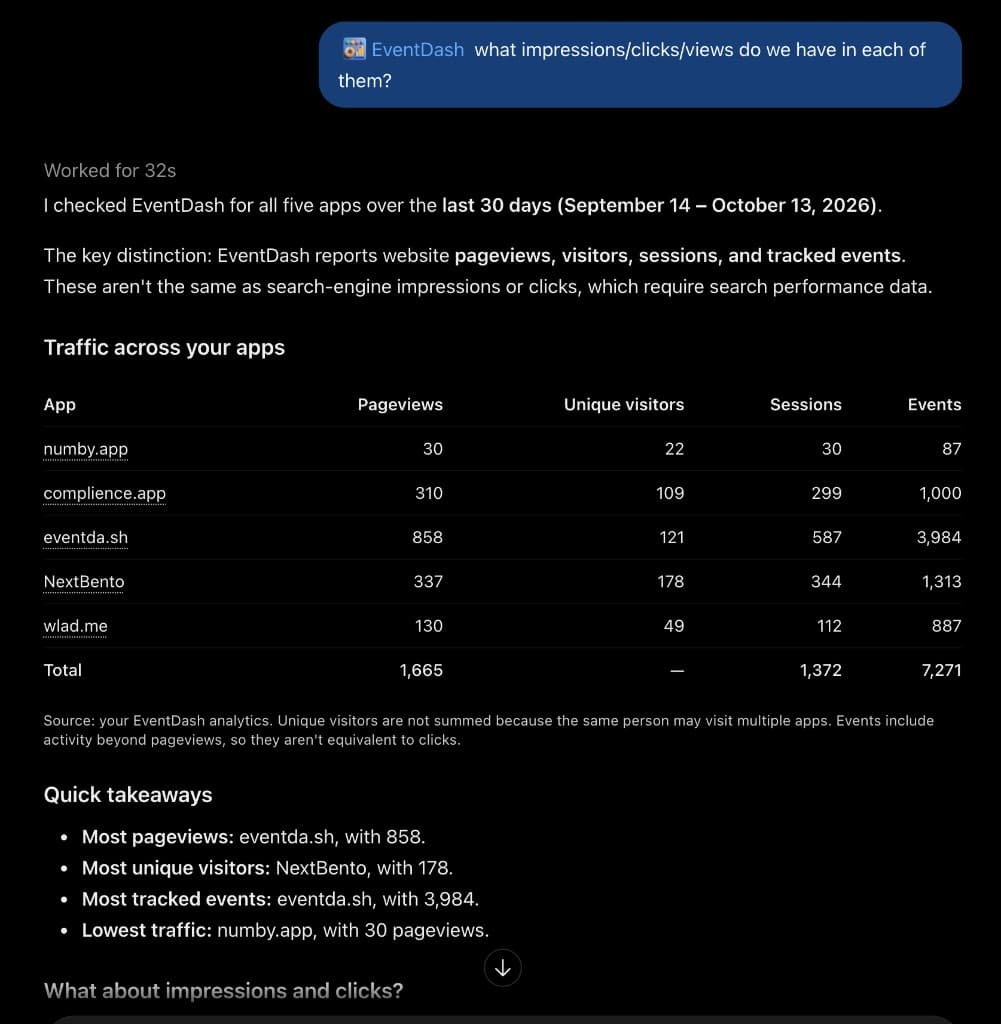
ChatGPT
Connect your EventDash account once. Then ask which app got the pageviews, visitors, and sessions. Read-only. No tracker key in the chat.
chatgpt.com
Audience
Same product whether you run one site or twenty. The difference is how many apps you need.
Keep Google Analytics when the weekly job is Google Ads attribution or BigQuery.
Keep Plausible or Fathom when the only question is traffic.
Keep PostHog when session replay, flags, or experiments are already the workflow.
See which flows convert without standing up GA4 or a product-analytics platform.
Standard is $19/month for 1M events and 5 apps. HTML attributes mean a designer can mark a signup button without a tracking ticket.
One workspace, many client sites. Pro covers 25 apps at $99/month.
Ship a script tag per client. Send a read-only link instead of a screenshot — they never log in and never see raw events. EventDash sets no cookies. Session IDs still live in localStorage until a consent-free mode ships; tell clients that honestly.
Rank index gaps, query cannibalization, and titles that miss the query — on the URLs that convert. Pin notes, or overlay GitHub commits and releases, on the Performance chart.
Standard and Professional. GitHub overlays are Standard and Professional; notes are on every plan. About 50 pages per sync, not a full crawl. EventDash does not invent titles or auto-attribute rankings. Request indexing still happens in Search Console.
Plans
Start free with 100k events/month. Free keeps that quota when the footer badge stays on the site.
Yearly billing: save up to $189/year
Free
Get started with no card
No credit card required.
Standard
For growing products
Start on Free, upgrade anytime from billing.
Professional
For teams that need scale
Start on Free, upgrade anytime from billing.
All plans include real-time charts. See pricing or create a free account.
Free plan badge
Put the EventDash logo and “Analytics by EventDash” in your footer. We check the homepage HTML, warn you for 14 days if it is missing, then lock the dashboard, API, and exports. Events keep coming in. Paid plans skip the badge.
FAQ
Privacy, plans, ranked SEO, and how we compare to GA4, Plausible, and PostHog.
Writing
Posts and short definitions for the questions this page only summarizes.
Guide
What privacy first web analytics is, and why “no cookies” is only one line of the checklist.
Guide
Pin a note or overlay GitHub commits and releases next to Search Console. EventDash marks the day, not the ranking cause.
Guide
Track signup and checkout drop-off without cookies or a tag-manager project.
Glossary
What the phrase means here, and which GA4 jobs EventDash does not take.
Glossary
Events and funnels for the signup path, not a pageview counter.
Glossary
No HTTP cookie. A localStorage session id still connects two pages.
Glossary
Collect less, and still see which signup step died.
Get started
100,000 events per month, one script, HTML attributes for goals. Free includes a footer badge. No credit card.
Paste the prompt into Cursor, Claude, or Codex.